


AI Assistant
Access intelligent voice assistance whenever you need it.
Klyvo
DPVR G6 AI Smart Glasses — Photo & Video Capture, Smart Glasses with Camera, Translation — Scan QR Code to Download App — Bluetooth Glasses with Photochromic Lenses (Bonus Sunglasses Lenses Included) — Ideal Father Wireless Eyewear
DPVR G6 AI Smart Glasses — Photo & Video Capture, Smart Glasses with Camera, Translation — Scan QR Code to Download App — Bluetooth Glasses with Photochromic Lenses (Bonus Sunglasses Lenses Included) — Ideal Father Wireless Eyewear
Regular price
$86.50
Regular price
$0.00
Sale price
$86.50
Taxes included.
Shipping calculated at checkout.
Quantity
Couldn't load pickup availability
🌟 DPVR G6 AI Smart Glasses — The Ultimate Summer Gift 🌟
(If you encounter any issues regarding usage or the product, please contact customer service first; we will provide a solution)
Smart Features & Design
DPVR G6 AI Smart Glasses combine functionality with style. These camera glasses and translation glasses are perfect for tech enthusiasts. They feature photochr
omic lenses that adapt to light conditions. The glasses come with a bonus set of interchangeable sunglasses lenses, enhancing versatility. Ideal for summer, they offer both practicality and fashion.


Key Benefits
- Camera & Translation: Capture moments and translate languages effortlessly.
- Photochromic Lenses: Adjust to light, ensuring comfort.
- Interchangeable Lenses: Bonus set for varied styles.
- Summer Gift: A thoughtful present for tech lovers.


Perfect for Summer
Enjoy the outdoors with DPVR G6. The glasses are a must-have for summer adventures. Their unique features make them a standout choice. Stay connected and stylish with DPVR G6 AI Smart Glasses.


NEXT-GENERATION AI SMART GLASSES
Capture life. See more. Do more.
Record hands-free, translate conversations and stay connected with intelligent technology designed for everyday life.
1080P HD
Hands-free recording
141 Languages
Smart translation
AI Assistant
Smart help on demand
Free Shipping
Easy Returns
Secure Checkout

AI
Smart. Stylish. Connected.
Technology designed for everyday life.
DESIGNED FOR REAL LIFE
Experience more. Without holding your phone.
Capture spontaneous moments, communicate across languages and stay connected while keeping your hands free.
Hands-Free Recording
Capture Full HD videos from your natural point of view.
AI Translation
Communicate confidently across 141 languages.
Everyday Smart Wear
Advanced technology in a stylish, wearable design.
✓
Photochromic lenses
✓
Bluetooth calls and music
✓
Built-in 4GB storage

REC
Capture your perspective
1080P hands-free video
AI
Smart assistance
Ready when you need it
SMART FEATURES
Technology that sees what you see.
Capture moments, communicate across languages and stay connected with smart technology designed for everyday life.
Integrated Camera
Take photos instantly without reaching for your phone.
1080P Video
Record hands-free Full HD video from your perspective.

Camera ready
AI
Smart assistance
141 Languages
Translate conversations through the connected mobile app.
Calls & Music
Answer calls and enjoy audio through Bluetooth connectivity.
4GB Storage
Save photos and videos directly to the glasses.
Capture hands-free
Stay present while recording the moment.
Smart everyday design
Technology built into a wearable frame.
Simple mobile connection
Manage intelligent functions through the DPVR app.
EXPERIENCE THE FUTURE
Ready to Experience DPVR G1?
Capture every moment hands-free, communicate in over 141 languages, and enjoy cutting-edge AI technology designed for everyday life.
HOW IT WORKS
Smart technology. Simple to use.
Capture photos, record videos, translate conversations, manage calls, enjoy music and access intelligent visual recognition.
 1
2
3
4
5
6
1
2
3
4
5
6
Take Photos
Press the upper button once to capture a photo instantly.
Record Video
Double-press the upper button to record hands-free video.
Translate Conversations
Connect to the DPVR app to access multilingual translation features.
Manage Calls
Answer, reject or end Bluetooth calls using the upper button.
Listen to Music
Play audio through the built-in Bluetooth speaker system.
Use AI Recognition
Double-press the lower button to activate supported visual recognition through the connected app.
Upper Button
Camera and calls
Photo, video and call controls.
Lower Button
AI and audio
Assistant, recognition and audio recording.
DPVR App
Advanced features
Translation, settings and file management.
WHY CHOOSE DPVR?
Smarter. Simpler. Hands-free.
Capture important moments without taking out your phone or looking away from the experience.
×
SMARTPHONE
VS
✓
DPVR GLASSES
×
Pull out your phone
✓
Tap your glasses
×
Risk missing the moment
✓
Capture instantly
×
Keep both hands occupied
✓
Enjoy hands-free convenience
×
Look down at a screen
✓
Stay present, eyes up
×
Interrupt the experience
✓
Record naturally
×
Carry a separate camera
✓
Use the camera built into the frame
Stay Present
Capture memories without constantly checking your phone.
Lightweight Design
Modern smart technology made for everyday wear.
Always Connected
Bluetooth calls, music and intelligent mobile features.
MADE FOR EVERYDAY MOMENTS
See the world. Capture it naturally.
From unforgettable trips to everyday adventures, DPVR G1 helps you capture life from your own perspective while keeping your hands free.
Travel
Capture new destinations without constantly holding your phone.
Outdoor Adventures
Record hiking, cycling and scenic moments from your point of view.
Content Creation
Create natural first-person videos for social media and memories.
Meetings & Conversations
Stay connected and access intelligent features while on the move.

Recording your journey
Hands-free perspective
Explore without limits
Stay present in every moment
EVERYTHING YOU NEED
Ready from the moment you open it.
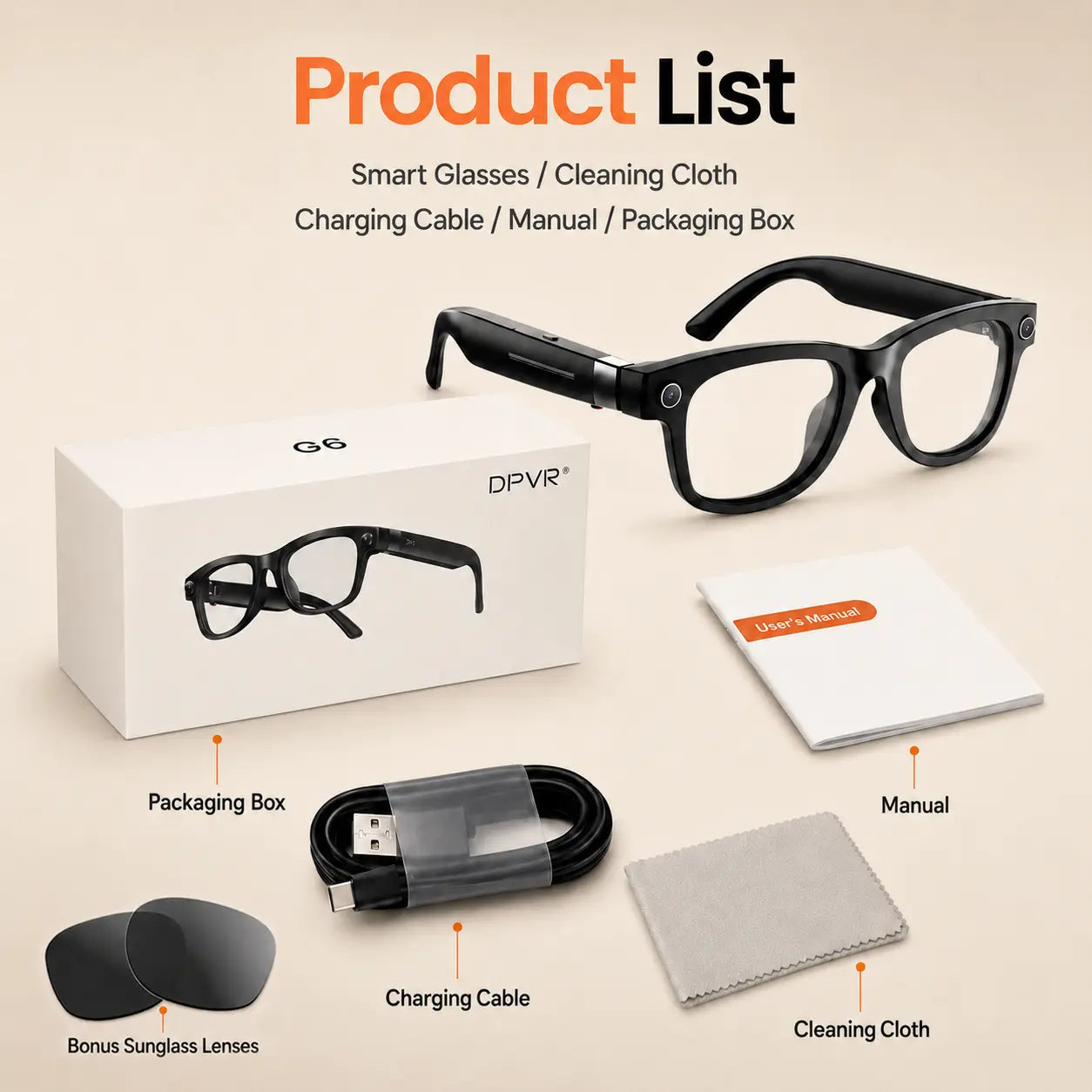
Your DPVR G1 package includes the essential accessories needed to set up, charge, clean and start using your smart glasses.
COMPLETE PACKAGE
DPVR
G1 AI Smart Glasses
Intelligent technology for everyday life
DPVR G1 Smart Glasses
AI-powered glasses with camera, Bluetooth audio and intelligent mobile features.
USB Charging Cable
Recharge the glasses using the included USB charging cable.
User Manual
Includes setup instructions, button controls and the QR code for the DPVR Glasses app.
Cleaning Cloth
Soft cloth designed to keep the lenses clean and clear.
Retail Packaging Box
Protective packaging designed to keep every component secure.
DPVR Glasses App
Scan the QR code included in the manual or search for “DPVR Glasses” in your compatible app store.
1
Charge
Connect the included USB cable.
→
2
Download
Get the app using the manual’s QR code.
→
3
Connect
Pair the glasses with your smartphone.
→
4
Explore
Start capturing and using smart features.
Easy Setup
Clear instructions included in the package.
Free Shipping
Available for eligible United States orders.
Secure Checkout
Protected and encrypted payment processing.
FREQUENTLY ASKED QUESTIONS
Everything you need to know.
Find quick answers about recording, translation, compatibility, connectivity and everyday use of your DPVR G1 Smart Glasses.
01 Can the glasses record without a phone?
Yes. The glasses can capture photos and record videos using their built-in controls and internal storage. You can connect them to your phone afterward to manage or transfer the files.
02 How does the translation feature work?
Connect the glasses to the DPVR Glasses mobile app and select the languages you want to use. The glasses capture the conversation, while the connected phone processes and displays or plays the translation.
03 Does translation require an internet connection?
Internet access may be required for translation, AI assistance and other cloud-based features. Basic functions such as taking photos or recording video can be used without an active internet connection.
04 Are the glasses compatible with iPhone and Android?
The DPVR Glasses app should be downloaded using the QR code included in the manual or by searching for “DPVR Glasses” in the compatible app store. Confirm app availability and operating system requirements before ordering.
05 How do I take photos and record videos?
Press the upper button once to take a photo. Double-press the upper button to begin video recording. Use the instructions in the included manual for the complete button controls.
06 How much internal storage do they have?
The glasses include 4GB of built-in storage for saving photos, videos and supported audio files before transferring them to your connected device.
07 Can I make calls and listen to music?
Yes. After pairing the glasses with your smartphone through Bluetooth, you can answer calls and listen to music using the integrated speakers and microphone.
08 What are photochromic lenses?
Photochromic lenses automatically become darker when exposed to UV light and return toward a clearer appearance in lower-light environments.
09 How do I download the DPVR Glasses app?
Scan the QR code included in the instruction manual or search for “DPVR Glasses” in your compatible app store.
10 What is included in the package?
The package includes the DPVR G1 Smart Glasses, a USB charging cable, user manual, cleaning cloth and protective retail box.
Easy Setup
Follow the included manual and app instructions.
Secure Shopping
Protected payment processing through your store checkout.
Free Shipping
Available for eligible orders according to store policy.
EXPERIENCE THE FUTURE
Capture life. Without missing the moment.
Record hands-free, translate conversations and stay connected with intelligent technology designed for everyday life.
✓
1080P HD Recording
Capture videos from your natural perspective.
✓
141-Language Translation
Communicate through the connected DPVR app.
✓
AI Smart Features
Intelligent assistance for everyday situations.
✓
Bluetooth Calls & Music
Stay connected while keeping your hands free.
Free Shipping
Easy Returns
Secure Checkout
AI
DPVR G1
Smart technology made wearable